How to Convert PDF to Word and Word to PDF for Free (No Software Required)
Need to convert a PDF to an editable Word document? Or turn your Word file into a professional PDF? You’re in the right place.
In this guide, I’ll show you how to convert between PDF and Word formats instantly—for free, without installing any software, and without compromising your privacy.
Why You Need a PDF/Word Converter
Whether you’re a student, professional, or just managing personal documents, there are countless situations where you need to switch between PDF and Word formats:
- Edit a PDF: Received a PDF contract that needs changes? Convert it to Word, make your edits, and save it back as PDF.
- Share professionally: Sending your resume or report? PDF ensures it looks the same on every device.
- Extract text: Need to copy content from a locked PDF? Converting to Word makes it accessible.
- Print-ready documents: Word files can shift when opened on different computers. PDF locks everything in place.
The Problem with Traditional Converters
Most online PDF converters have serious drawbacks:
❌ They upload your files to their servers (privacy risk)
❌ They add watermarks unless you pay
❌ They have file size limits
❌ They require email registration
❌ The conversion quality is poor
That’s why I created a better solution.
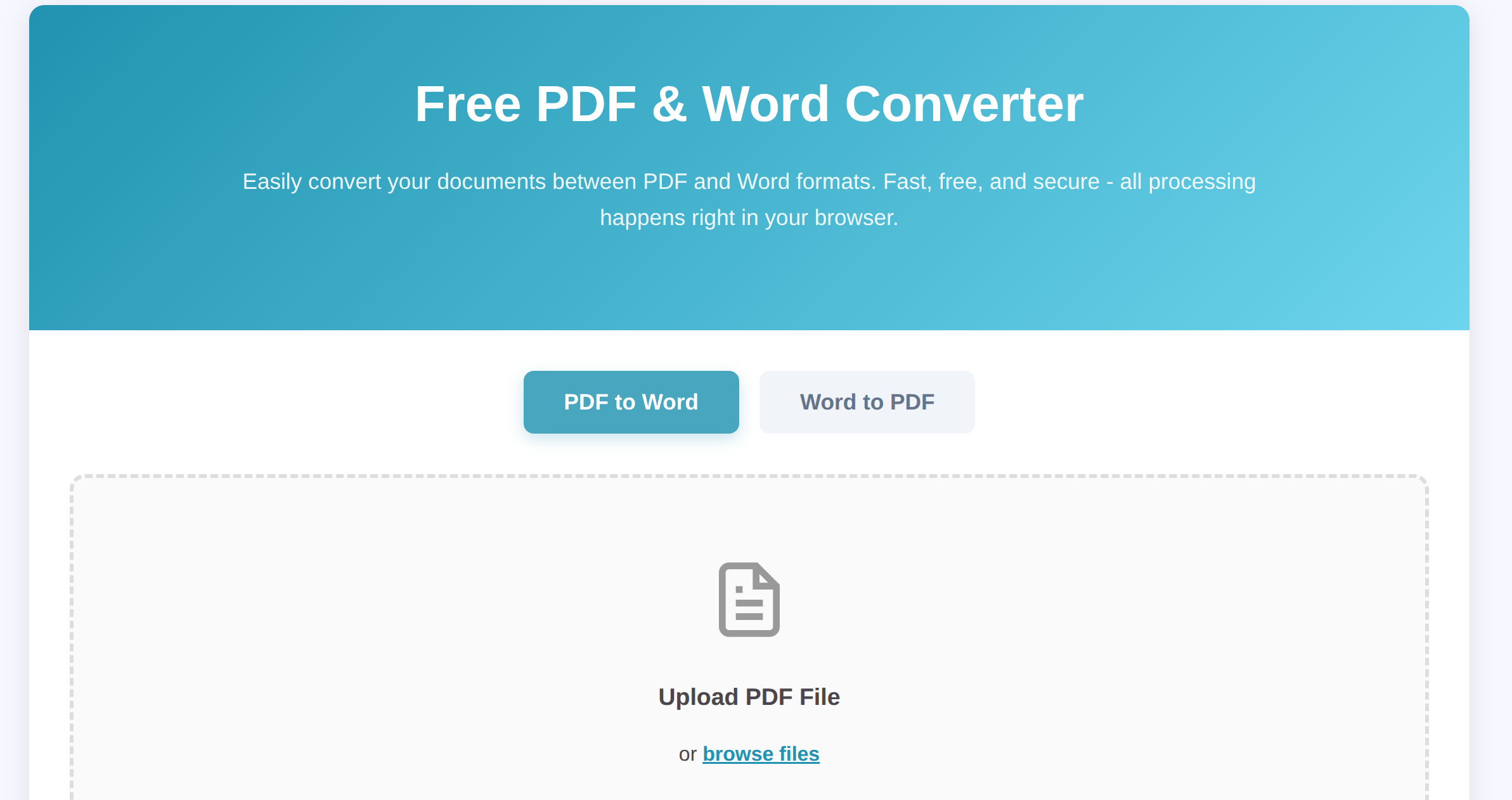
Introducing Our Free PDF Converter Tool
Our Free PDF & Word Converter solves all these problems:
✅ 100% Private – Files never leave your browser
✅ No Watermarks – Clean, professional output
✅ No Limits – Convert unlimited files
✅ No Registration – Start converting immediately
✅ High Quality – Preserves formatting and layout
And best of all? It’s completely free.
How to Convert PDF to Word
Converting a PDF to an editable Word document takes just 3 steps:
- Go to the tool: Visit richtechtalk.com/pdf-converter
- Select “PDF to Word” tab: Click the first tab at the top
- Upload your PDF: Drag and drop your file or click “browse files”
- Download: Wait a few seconds and download your .docx file
That’s it! Your PDF is now a fully editable Word document.
What Happens to Your PDF?
When you upload a PDF, our tool:
- Extracts all text content from each page
- Preserves paragraph structure
- Captures images (where possible)
- Rebuilds everything in a clean Word format
Privacy Note: The entire conversion happens in your browser. Your file never touches our servers, so your confidential documents are 100% safe.
How to Convert Word to PDF
Need to go the other way? Converting Word to PDF is even easier:
- Visit the converter: richtechtalk.com/pdf-converter
- Click “Word to PDF” tab: Switch to the second tab
- Upload your Word file: Drop your .docx file in the upload area
- Get your PDF: Download the converted PDF in seconds
Your Word document is now a professional, shareable PDF that looks perfect on any device.
Why Convert Word to PDF?
PDFs are the gold standard for sharing documents because:
- They look identical on every device (no shifting text or broken formatting)
- They can’t be easily edited (perfect for final versions)
- They’re universally compatible (anyone can open them)
- They’re smaller in file size
Tips for Better Conversions
For PDF to Word:
- Simple PDFs work best: Text-heavy documents convert perfectly
- Scanned PDFs are tricky: If your PDF is actually an image scan, the text won’t be editable
- Check formatting: Complex layouts (like magazines) might need minor adjustments
For Word to PDF:
- Save first: Make sure your Word doc is saved with final edits
- Check fonts: Stick to common fonts like Arial or Times New Roman for best results
- Review the PDF: Always download and check the PDF before sharing
Other Free Tools You’ll Love
If you found this PDF converter useful, check out our other free tools:
- Image Compressor – Reduce image file sizes by up to 90%
- World Clocks – Schedule meetings across time zones
- Image Cropper – Crop and resize images instantly
All tools are free, private, and require zero installation.
Frequently Asked Questions
Is it really free?
Yes! There are no hidden costs, no upgrade prompts, and no paywalls. Convert as many files as you want.
Will my files be stored?
No. All processing happens locally in your web browser. Your files never touch our servers, so we literally cannot store them.
What file formats are supported?
- PDF to Word: Converts .pdf to .docx (Microsoft Word format)
- Word to PDF: Converts .docx to .pdf
Does it work on mobile?
Absolutely! Our tool works on smartphones, tablets, and computers. Any device with a modern web browser.
Can I convert scanned PDFs?
The tool extracts text from standard PDFs. If your PDF is a scanned image, you’ll need OCR (Optical Character Recognition) software first.
Why is it better than Google Docs or Microsoft Word?
While Google Docs and Word can convert files, they:
- Require you to upload to their cloud
- Only work if you have an account
- Often mess up formatting
Our tool is instant, anonymous, and preserves formatting better.
Ready to Convert Your Files?
Stop wrestling with expensive software or sketchy online converters. Try our Free PDF & Word Converter now and see the difference.
No registration. No watermarks. No nonsense. Just fast, free, private conversions.